- Get the footage
- Put the DVD in your drive, open the largest .vob file using Avidemux
- or find it on YouTube, download it with, for example, youtube-dl at the command line or with DownloadHelper from Firefox
- In Avidemux, specify the clip you want by clicking A at the first frame and B at the last frame

- To export the frames click File > Save > Save Selection as JPEG Images.
- Open GIMP to import the images: Click File > Open as Layers (Ctrl-Alt-O), browse to and mark the JPEG files you just saved with Avidemux.
- To save as an animated GIF file: Click File > Export, change to .GIF filetype, apply settings in pop-up

Specify how many milliseconds each frame should show by dividing 1 by the frame rate of the actual movie clip (open video in player, for example VLC, find the frame rate in some properties window) and multiplying by 1000. Alternatively, each layer name can have the delay specified in a paranthesis, for example by adding " (10ms)" to it. - Open the GIF to see if it is working as planned.
Showing posts with label Avidemux. Show all posts
Showing posts with label Avidemux. Show all posts
Sunday, April 7, 2013
How to create an animated GIF from a movie scene using Avidemux and GIMP


Saturday, November 12, 2011
Using Canon Legria HF R16
So, my good old FLIP camcorder broke and I picked up a Canon on sale. Thus I present: Notes on the joys and horrors of using a Canon Legria HF R16 camcorder on Linux and Mac. Practical notes and first impressions, mostly. Probably useful for most Canon camcorder models.
Believe it or not: I asked the two people working in my local camera shop if Canon camcorders worked well with Macs. They looked horrified at me, assured me Macs were nothing but trouble and that neither Canon nor JVC or any other brand would work with Macs or Linux. Of course it works (more or less) with both systems, of course it's fool proof on the Mac.
Unpacking and shooting
One's low expectations go nowhere as the package reveals the camera, a couple of cables and some CDs. Because the cables are the least you can expect, the CDs contain some PDF manuals and some - you guessed it - Windows-only software (Pixela). You'll have read what's worth reading in the printed manual long before the battery has charged.
Basic settings are set from three resolutions ("LW" 1920x1080 aka 16:9 format in 1080p, "L" 1600x1200 and "S" 640x480 both being 4:3 format) in "Normal" (grainy), "Fine" or "Super Fine" (sharp) quality and four levels of picture quality ("Long Play" 5 Mbps, "Standard Play" 7 Mbps, "XP+" 12 Mbps and "FXP" 17 Mbps) - that's 36 possible combinations already. Then there is also nine specialized settings ("Portrait", "Low light" etc), something called "Cine" mode, three specialized white balance settings beside the automatic plus some digital and image effects settings. That's a lot of possible settings just on this low end model - plus, of course, the everything "AUTO" setting.
Exciting...
Using it with Linux: The resolution settings are fishy
The camera mounts as read-only USB "stick". Open with a file browser (Dolphin, Konqueror, whatever) and find the recorded clips in CANON > AVCHD > BDMV > STREAM. Unfortunately, WYSI-not-WYG.
Apparently, all format settings produce *.MTS files of 1440x1080 pixels (4:3)! Where did the pixels go? If you can create a 1920x1080 pixels clip after import with Canon software on Windows - where do the extra pixels come from? Are they what the magical Windows-only software can do?
Might not be entirely cheating because the settings do appear to result in files of some difference in file size and there are some other weird files on the memory card. As usual: Avidemux can re-encode the clips to any other format.
Using it with Mac and iMovie
iMovie detects the camcorder as you connect it with USB and start an import program that lets you select which clips to transfer to which projects. Very easy. It then converts all 50 fps clips to 25 fps. Very annoying. But of course, other geeks have already worked out a very simple hack for allowing iMovie to handle both 25 and 50 fps clips. Let me guess: Apple has some other, more expensive program that will do the same at an exorbitant price?
Anyway both "L" 1600x1200 and "S" 640x480 result in imported clips of 1440x1080 pixels (encoded in "icod" which cannot be viewed in VLC). However, the "LW" 1920x1080 does yield clips that actually are - fanfare - 1920 by 1080 pixels. The people at Apple have probably paid Canon for the privilege of performing this magic.
Conclusion
If you know more than I do about this, please comment! I guess video clips in some cases are like sausages and politics...
Believe it or not: I asked the two people working in my local camera shop if Canon camcorders worked well with Macs. They looked horrified at me, assured me Macs were nothing but trouble and that neither Canon nor JVC or any other brand would work with Macs or Linux. Of course it works (more or less) with both systems, of course it's fool proof on the Mac.
Unpacking and shooting
One's low expectations go nowhere as the package reveals the camera, a couple of cables and some CDs. Because the cables are the least you can expect, the CDs contain some PDF manuals and some - you guessed it - Windows-only software (Pixela). You'll have read what's worth reading in the printed manual long before the battery has charged.
Basic settings are set from three resolutions ("LW" 1920x1080 aka 16:9 format in 1080p, "L" 1600x1200 and "S" 640x480 both being 4:3 format) in "Normal" (grainy), "Fine" or "Super Fine" (sharp) quality and four levels of picture quality ("Long Play" 5 Mbps, "Standard Play" 7 Mbps, "XP+" 12 Mbps and "FXP" 17 Mbps) - that's 36 possible combinations already. Then there is also nine specialized settings ("Portrait", "Low light" etc), something called "Cine" mode, three specialized white balance settings beside the automatic plus some digital and image effects settings. That's a lot of possible settings just on this low end model - plus, of course, the everything "AUTO" setting.
Exciting...
Using it with Linux: The resolution settings are fishy
The camera mounts as read-only USB "stick". Open with a file browser (Dolphin, Konqueror, whatever) and find the recorded clips in CANON > AVCHD > BDMV > STREAM. Unfortunately, WYSI-not-WYG.
Apparently, all format settings produce *.MTS files of 1440x1080 pixels (4:3)! Where did the pixels go? If you can create a 1920x1080 pixels clip after import with Canon software on Windows - where do the extra pixels come from? Are they what the magical Windows-only software can do?
Might not be entirely cheating because the settings do appear to result in files of some difference in file size and there are some other weird files on the memory card. As usual: Avidemux can re-encode the clips to any other format.
Using it with Mac and iMovie
iMovie detects the camcorder as you connect it with USB and start an import program that lets you select which clips to transfer to which projects. Very easy. It then converts all 50 fps clips to 25 fps. Very annoying. But of course, other geeks have already worked out a very simple hack for allowing iMovie to handle both 25 and 50 fps clips. Let me guess: Apple has some other, more expensive program that will do the same at an exorbitant price?
Anyway both "L" 1600x1200 and "S" 640x480 result in imported clips of 1440x1080 pixels (encoded in "icod" which cannot be viewed in VLC). However, the "LW" 1920x1080 does yield clips that actually are - fanfare - 1920 by 1080 pixels. The people at Apple have probably paid Canon for the privilege of performing this magic.
Conclusion
If you know more than I do about this, please comment! I guess video clips in some cases are like sausages and politics...
"To retain respect for sausages and laws, one must not watch them in the making."Either way my videos should drastically improve from now on. Compared to the FLIP the Canon offers much better optics, settings (portrait, low light etc.) for special recording situations and (obviously) better specifications on pretty much every other parameter. Except battery time which amazingly appears to be little more than an hour.
Monday, November 8, 2010
Differences in nutshells - video editing and software upgrades
Avidemux has proven a simple yet efficient piece of software for video editing in Linux. Most of my videos on Vimeo has been produced using nothing else. On the Macbook however, iMovie steals the attention with its intuitive interface, drag-and-drop handling of multiple clips and near magical completion of complex operations.
But working with a combination of the two has proved quite practical. Each has its weaknesses.
Video editing
Making a video of several excerpts of other videos is much more convenient in iMovie. But as the videos in question have been downloaded from YouTube (mostly being in *.flv format) iMovie can't import them directly.
No problem since Avidemux opens anything and lists 16 different video codecs, 8 different audio codecs and 13 different containers for export options. That's a theoretical 1664 different combinations each with many possible varieties (quality settings and filters). And most combinations actually works - but check your output files because some might have failed without warning!
Saving a file in iMovie is a completely different experience. In fact it probably couldn't be any more different. And in this case I believe a screenshot will say more than a thousand words:
iMovie, being ridiculously picky on the other hand, imports only about four (4) different video file types. Googling for some format that will work turns up a wide selection of software that will fix the problem without telling me how it does so - no doubt commercial trial versions most of them.
Software upgrades
So, mid-October with some excitement I notice my clear favorite photography manager is released in a new version 1.5. Mid-December the version available in openSUSE is still 1.2.
Apple on the other hand misses few chances to throw a popup about iLife 11 at me. "iLife" - the suspiciously named package of audio, image and video editing software. When trying to get something done they want to tell me about the new features I can get for only about 55 euros. OK I peek at it: hmm... new backgrounds for title frames? Really?
Now, on a final notice, comparing Avidemux and iMovie really is comparing apples to oranges. Other programs for Linux should share the drag and drop multi clip functionality of iMovie. I wanted to try OpenMovieEditor since that program is what is mentioned in Crafting Digital Media by Daniel James which I bought. That program installed fine via YaST but didn't run so I posted a question in the openSUSE forum and got highly competent help pretty fast. Another user was able to help me find out which little extra package to install - now it runs but crashes at any edit.
Differences in nutshells indeed: Linux is free, very powerful and bleeding edge. The Mac is annoyingly commercial, fool proof and conservatively designed.
But working with a combination of the two has proved quite practical. Each has its weaknesses.
Video editing
Making a video of several excerpts of other videos is much more convenient in iMovie. But as the videos in question have been downloaded from YouTube (mostly being in *.flv format) iMovie can't import them directly.
No problem since Avidemux opens anything and lists 16 different video codecs, 8 different audio codecs and 13 different containers for export options. That's a theoretical 1664 different combinations each with many possible varieties (quality settings and filters). And most combinations actually works - but check your output files because some might have failed without warning!
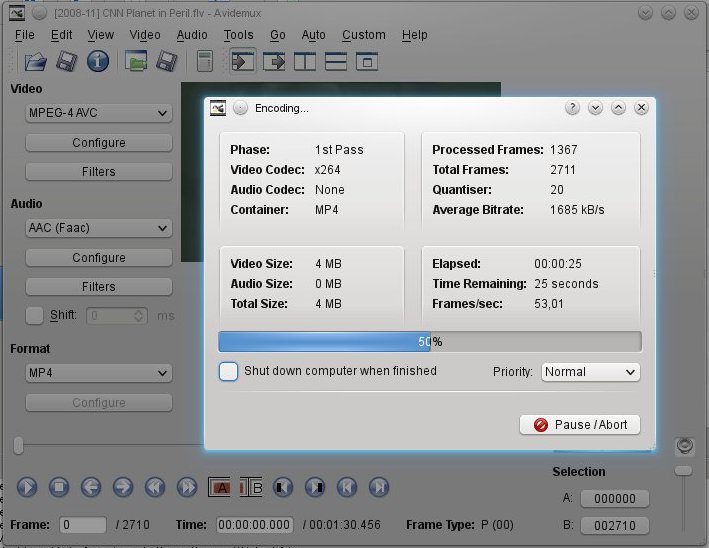 |
| Powerful: Using Avidemux to save a .flv file downloaded from YouTube as something iMovie can import. Here by choosing MPEG-4 AVC as video codec (shown as "x264 in the encoding progress window), AAC (Faac) as audio codec and MP4 as container. |
Saving a file in iMovie is a completely different experience. In fact it probably couldn't be any more different. And in this case I believe a screenshot will say more than a thousand words:
 |
| Fool proof: The export menu has a table listing resolutions on the vertical and target platforms on the horizontal making it hard to make a bad choice for video size. The file will be a special Apple type of MP4 and so far I haven't noticed anywhere in iMovie to change that. |
iMovie, being ridiculously picky on the other hand, imports only about four (4) different video file types. Googling for some format that will work turns up a wide selection of software that will fix the problem without telling me how it does so - no doubt commercial trial versions most of them.
Software upgrades
So, mid-October with some excitement I notice my clear favorite photography manager is released in a new version 1.5. Mid-December the version available in openSUSE is still 1.2.
 |
| The digiKam website presents a new release of their awesome software. |
Apple on the other hand misses few chances to throw a popup about iLife 11 at me. "iLife" - the suspiciously named package of audio, image and video editing software. When trying to get something done they want to tell me about the new features I can get for only about 55 euros. OK I peek at it: hmm... new backgrounds for title frames? Really?
Now, on a final notice, comparing Avidemux and iMovie really is comparing apples to oranges. Other programs for Linux should share the drag and drop multi clip functionality of iMovie. I wanted to try OpenMovieEditor since that program is what is mentioned in Crafting Digital Media by Daniel James which I bought. That program installed fine via YaST but didn't run so I posted a question in the openSUSE forum and got highly competent help pretty fast. Another user was able to help me find out which little extra package to install - now it runs but crashes at any edit.
Differences in nutshells indeed: Linux is free, very powerful and bleeding edge. The Mac is annoyingly commercial, fool proof and conservatively designed.
Subscribe to:
Posts (Atom)