Showing posts with label video. Show all posts

Saturday, November 12, 2011

Using Canon Legria HF R16

So, my good old FLIP camcorder broke and I picked up a Canon on sale. Thus I present: Notes on the joys and horrors of using a Canon Legria HF R16 camcorder on Linux and Mac. Practical notes and first impressions, mostly. Probably useful for most Canon camcorder models.

Believe it or not: I asked the two people working in my local camera shop if Canon camcorders worked well with Macs. They looked horrified at me, assured me Macs were nothing but trouble and that neither Canon nor JVC or any other brand would work with Macs or Linux. Of course it works (more or less) with both systems, of course it's fool proof on the Mac.

Unpacking and shooting

One's low expectations go nowhere as the package reveals the camera, a couple of cables and some CDs. Because the cables are the least you can expect, the CDs contain some PDF manuals and some - you guessed it - Windows-only software (Pixela). You'll have read what's worth reading in the printed manual long before the battery has charged.

Basic settings are set from three resolutions ("LW" 1920x1080 aka 16:9 format in 1080p, "L" 1600x1200 and "S" 640x480 both being 4:3 format) in "Normal" (grainy), "Fine" or "Super Fine" (sharp) quality and four levels of picture quality ("Long Play" 5 Mbps, "Standard Play" 7 Mbps, "XP+" 12 Mbps and "FXP" 17 Mbps) - that's 36 possible combinations already. Then there is also nine specialized settings ("Portrait", "Low light" etc), something called "Cine" mode, three specialized white balance settings beside the automatic plus some digital and image effects settings. That's a lot of possible settings just on this low end model - plus, of course, the everything "AUTO" setting.

Exciting...

Using it with Linux: The resolution settings are fishy

The camera mounts as read-only USB "stick". Open with a file browser (Dolphin, Konqueror, whatever) and find the recorded clips in CANON > AVCHD > BDMV > STREAM. Unfortunately, WYSI-not-WYG.

Apparently, all format settings produce *.MTS files of 1440x1080 pixels (4:3)! Where did the pixels go? If you can create a 1920x1080 pixels clip after import with Canon software on Windows - where do the extra pixels come from? Are they what the magical Windows-only software can do?

Might not be entirely cheating because the settings do appear to result in files of some difference in file size and there are some other weird files on the memory card. As usual: Avidemux can re-encode the clips to any other format.

Using it with Mac and iMovie

iMovie detects the camcorder as you connect it with USB and start an import program that lets you select which clips to transfer to which projects. Very easy. It then converts all 50 fps clips to 25 fps. Very annoying. But of course, other geeks have already worked out a very simple hack for allowing iMovie to handle both 25 and 50 fps clips. Let me guess: Apple has some other, more expensive program that will do the same at an exorbitant price?

Anyway both "L" 1600x1200 and "S" 640x480 result in imported clips of 1440x1080 pixels (encoded in "icod" which cannot be viewed in VLC). However, the "LW" 1920x1080 does yield clips that actually are - fanfare - 1920 by 1080 pixels. The people at Apple have probably paid Canon for the privilege of performing this magic.

Conclusion

If you know more than I do about this, please comment! I guess video clips in some cases are like sausages and politics...
"To retain respect for sausages and laws, one must not watch them in the making."
Either way my videos should drastically improve from now on. Compared to the FLIP the Canon offers much better optics, settings (portrait, low light etc.) for special recording situations and (obviously) better specifications on pretty much every other parameter. Except battery time which amazingly appears to be little more than an hour.

Two years later review: my FLIP Mino HD camera

On the 21st of September 2009 I biked to Bella Center in Copenhagen, site of the COP15 climate change conference three months later, to participate in the kick-off event for the TH!NKABOUTIT #2 blogging project. For use in our blogging each participant was given a 4 GB FLIP Mino HD camera with the European Journalism Centre logo on the cover.

The FLIPs come in a little pouch and with custom designed covers.

I never considered myself a video guy. Let alone video-blogger, or "vlogger", of which I still haven't seen a reasonable example. Video tech was also uncharted territory to me and not one I figured worth the learning curve to enter. But the FLIP changed that mostly because it's so easy to use: power on, press the big red "Record" button to start and then stop recording, flip out the USB connector and transfer the MP4-files to any computer. Also, it delivers surprisingly high quality sound and pictures, and it's the size of a mobile phone (smaller than most smartphones).

The 4 GB version lists its recording time to one hour. It's closer to 55 minutes but that's because unnecessary files are taking up space on the new recorder's drive. Fortunately, it connects like any other USB stick so the handful of PDFs and an .exe file (who needs .exe files?) can be quickly moved to your computer for safekeeping or simply deleted. This will bring up recording time to almost an hour again - until next time you upgrade your FLIP software and the unnecessary files will reappear.

So, I began clipping segments of recordings using avidemux in Linux; first example a jumpy walk through a crowded outdoor photo exhibition (not impressive film art). Also in avidemux I started using the xvid codec and for example managed to fit this 51 minutes speech into a just 225 MB file suitable for my free Vimeo account (still not impressive and should have fixed the sound). And I strapped it to my bike to make a recording of my daily trip home from work. I snugged it out to get some rare footage from inside Cairo Airport during the revolution curfew. As a Macbook Pro entered the picture, I must admit ambitions sky rocketed. iMovie was to my editing ambitions what the FLIP was to my recording ambitions - userfriendliness inspiring a new hobby. The FLIP comes with idiot-proof software that will make you instant "MagicMovies" and handle your files easily. Even as I started using more and more advanced features of iMove, I still have thrown in segments of FLIP MagicMovies here and there (the trained eye will notice, for example from 17 seconds to 27 seconds into my first Urban Greening video).

In short, the FLIP cameras were bargains in 2009. Being very small, very easy to use and quite cheap at the same time I have to wonder why they weren't more popular. Now, of course, they face competition from smartphones and more expensive camcorders designed smaller and smaller too. But they are even cheaper now and come with 8 GB. Still something I'd consider buying. And I did consider buying a new FLIP recently - because during recording of my second Urban Greening video it fell from my pocket and unfortunately the display broke. So sad. And the bottom line is: FLIP and the TH!NKABOUTIT project has changed me into a person who wants to film. And even after two years of frequent use I was still very happy with the FLIP Mino HD.

The display is obviously out of order.

I can wholeheartedly recommend you buy a FLIP - if you don't already have a smartphone or DSLR with HD video capabilities, of course. Alternatively, a FLIP would serve great as a second camcorder if your other one is a bit too expensive to strap onto flying objects or operating during intoxication or other risky situations.

My choice for a new (budget) camcorder fell on a Canon Legria HF R16 found on sale. You can probably expect rants about its software and attitude towards Linux and Mac in the near future, a slightly more thought through review in two years. And perhaps more crazy videos made with my old FLIP now strapped onto more and more hazardously placed objects?

Saturday, March 5, 2011

A Mac win... in Africa

OK... don't really know if it's a "win" as much as an obvious advantage of the mobility of a laptop and the funny convenience of fool proof iWhatever apps. Long story short: I traveled through Kenya visiting development projects, documenting the trip in text notes, photographs and video alike. The combo of a Flip camera and a Macbook proved... pretty nice.
Me, my 11 inch Macbook and my Flip Mino HD camera (with cheap tripod) in the middle of nowhere, Kenya.
The Flip cameras are affordable, very small and shoots good video. But they don't have a lot of storage on them so you need to empty them via USB quite often. That's where your laptop or notebook enters the picture.

As ranted about the other day I just upgraded to iMovie '11. One of the new features is an "instant trailer" function. Not sure it'll be truly useful - but it is funny. Here is a documentary style trailer of the videos from the trip I put on Vimeo done in close to no time using iMovie '11:


Still wouldn't live without the desktop Linux box, however. It's got affordable terrabytes of storage, ultra compatibility of video formats and just so many advantages as previously blogged about. For example, I'm writing these words from it and would feel heavily disadvantaged doing even such a simple blog post from the Mac. Sorry, Macbook freaks.

Monday, November 8, 2010

Differences in nutshells - video editing and software upgrades

Avidemux has proven a simple yet efficient piece of software for video editing in Linux. Most of my videos on Vimeo has been produced using nothing else. On the Macbook however, iMovie steals the attention with its intuitive interface, drag-and-drop handling of multiple clips and near magical completion of complex operations.

But working with a combination of the two has proved quite practical. Each has its weaknesses.

Video editing

Making a video of several excerpts of other videos is much more convenient in iMovie. But as the videos in question have been downloaded from YouTube (mostly being in *.flv format) iMovie can't import them directly.

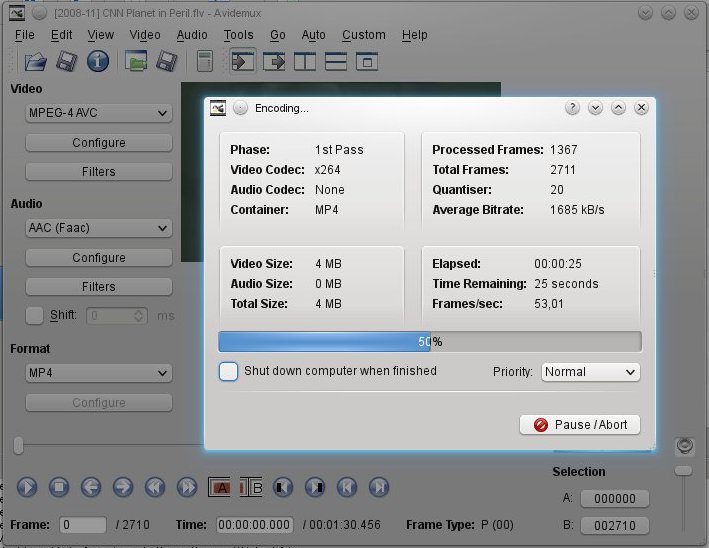
No problem since Avidemux opens anything and lists 16 different video codecs,  8 different audio codecs and 13 different containers for export options. That's a theoretical 1664 different combinations each with many possible varieties (quality settings and filters). And most combinations actually works - but check your output files because some might have failed without warning!


Powerful: Using Avidemux to save a .flv file downloaded from YouTube as something iMovie can import. Here by choosing MPEG-4 AVC as video codec (shown as "x264 in the encoding progress window), AAC (Faac) as audio codec and MP4 as container.

Saving a file in iMovie is a completely different experience. In fact it probably couldn't be any more different. And in this case I believe a screenshot will say more than a thousand words:

Fool proof: The export menu has a table listing resolutions on the vertical and target platforms on the horizontal making it hard to make a bad choice for video size. The file will be a special Apple type of MP4 and so far I haven't noticed anywhere in iMovie to change that.


iMovie, being ridiculously picky on the other hand, imports only about four (4) different video file types. Googling for some format that will work turns up a wide selection of software that will fix the problem without telling me how it does so - no doubt commercial trial versions most of them.

Software upgrades

So, mid-October with some excitement I notice my clear favorite photography manager is released in a new version 1.5. Mid-December the version available in openSUSE is still 1.2.

The digiKam website presents a new release of their awesome software.

Apple on the other hand misses few chances to throw a popup about iLife 11 at me. "iLife" - the suspiciously named package of audio, image and video editing software. When trying to get something done they want to tell me about the new features I can get for only about 55 euros. OK I peek at it: hmm... new backgrounds for title frames? Really?

Now, on a final notice, comparing Avidemux and iMovie really is comparing apples to oranges. Other programs for Linux should share the drag and drop multi clip functionality of iMovie. I wanted to try OpenMovieEditor since that program is what is mentioned in Crafting Digital Media by Daniel James which I bought. That program installed fine via YaST but didn't run so I posted a question in the openSUSE forum and got highly competent help pretty fast. Another user was able to help me find out which little extra package to install - now it runs but crashes at any edit.

Differences in nutshells indeed: Linux is free, very powerful and bleeding edge. The Mac is annoyingly commercial, fool proof and conservatively designed.

Sunday, September 26, 2010

Ode to VLC

Oh VLC
Without you any OS sucks

The day I first installed you
I found a friend -
And a friendship that
I pray will never end.

Your interface - so sweet
And so simple -
Kept me going
When other programs were cluttered.

You never ever judged me,
You understood my codec sorrow.
Then you told me it needn't be that way
And gave me the hope of a better tomorrow.

You were always there for me,
I knew I could count on you.
You just played the damn media files
Whether I was on Mac, Windows or Linux.

Your continued development
Is so precious to me,
I hope it grows and flourishes
And lasts unto infinity.

(With just a little inspiration from Ode To My True Friend by Elizabeth Pinard - which just happened to be the top hit when I googled for "ode to".)